Posts

Showing posts with the label Tech

Ransomware Ransomware Ransomware !!!

Image
In this modern era Ransomware is something which is the new and peoples don't have any idea what it is and in what way it can harm you. After reading this post you will get a clear idea of this epic word RANSOMWARE . So let's get started... Ransomware is a type of malware that hackers intentionally send to your device(Mobile/PC/Laptop) through social engineering. After malware inserted into your device, it will start encrypting your device data and lock them with a key. That is only known by hackers which had sent malware to your system. To get that key back and decrypt your data hacker will demand some bit currency to pay. After you pay those much of demanded currency you will only get your data to be available for you. Click Here So now the question is how we can secure our data from ransomware attacks?? To accept the truth, we need to be much aware while using the internet. Then only it is possible to be safe from a ransomware attack. Otherwise, it will make a target for you...

Udemy Featured Machine Learning Courses only at Rs.455.

HURRY UP!!!! Only 5 hour left to get 96% off on most popular Machine Learning A-Z™: Hands-On Python & R In Data Science course on Udemy. Get only in Rs.455 on any course. Be Master in Machine Learning 🤗 Learn to create Machine Learning Algorithms in Python and R from two Data Science experts. Code templates included. Interested in the field of Machine Learning? Then this course is for you! This course has been designed by two professional Data Scientists so that we can share our knowledge and help you learn complex theory, algorithms, and coding libraries in a simple way. We will walk you step-by-step into the World of Machine Learning. With every tutorial, you will develop new skills and improve your understanding of this challenging yet lucrative sub-field of Data Science. This course is fun and exciting, but at the same time, we dive deep into Machine Learning. It is structured the following way: Part 1 - Data Preprocessing Part 2 - Regression: Simple Linear Regression, M...

What’s difference between HTML and HTTP ?

Image
Many folks get confused between these two terms which are associated with the Web. Are they really same? First thing first. HTML is a Language while HTTP is a Protocol. Doesn’t make much sense..? it’s okay! We’ll discuss it in more detail. HTML ( H yper t ext M arkup L anguage) is a language for marking the normal text so that it gets converted into hypertext. Again, not so clear. Basically, HTML tags (e.g. “<head>”, “<body>” etc.) are used to tag or mark normal text so that it becomes hypertext and several hypertext pages can be interlinked with each other resulting in the Web. Please note that the HTML tags are used to help render web pages as well in the Browser. On the contrary, HTTP ( H yper t ext T ransfer P rotocol) is a protocol for transferring the hypertext pages from Web Server to Web Browser. For exchanging web pages between Server and Browser, an HTTP session is setup using protocol methods (e.g. GET, POST etc.). This would be ...

How to Use your old smart phone as a wireless security camera

Image
Like most households these days, yours probably has one or more old smart phones that have been retired to a junk drawer after upgrading, but a simple downloaded app can turn them all into wireless security cameras! Just download and install the app, mount the phone where it can “see” the area you wish to monitor, then view everything that happens there via the browser on any computer or active smart phone.  IP Webcam is a great app that uses your old phone’s camera to capture and send streaming video directly to any web browser in the world. Android users can download the app from the Google Play Store for free. If you have an old iPhone laying around you can download it from iTunes . Also Read :  How to find a misplaced phone when you don’t have another phone to call it with The app is easy to install, set up and use. Simply download, install and run the app, then place the phone with the camera facing the area you wish t...

Give your smartphone or tablet a fully functional clipboard

Image
Just like desktop and laptop computers, all smart phones and tablets have a rudimentary clipboard that allows you to “copy” and “paste” text from one app to another. Unfortunately, that’s about all you can do with it. Even worse, the contents of the clipboard are overwritten every time you “copy” something else. The good news is you can download a clipboard app that will give your phone a fully functional clipboard. Also Read :  How to back up your iPhone, iPad or iPod Touch to your iCloud account Most of the available apps allow you to copy and store multiple snippets which you can then paste into any app, at any time.  There are several great clipboard apps available for both iOS and Android devices. The ones I like best are Clipper (for Android) and Clips (for Apple iOS). Simply download the app that works with your device. Like this post? If so, I hope you’ll consider sharing it with your friends.

Warning: Apple will soon start ‘analyzing’ your iCloud data and personal files

Image
Apple is planning to release iOS 10.3 before long, and with that update will come several significant changes to the operating system. I believe most of those changes will be good ones, but there’s one that concerns me. Beginning with iOS 10.3, Apple will start “analyzing” your iCloud data to “help them improve intelligent features and services such as Siri and other similar or related services. ” In a nutshell, that means Apple will soon start scanning your email, your notes, your contacts, your photos, your calendar, Keychain, Find My iPhone, your iTunes items and all the various files you have stored on iCloud.  What’s more, if your device is running the recently released iOS 10.3 beta, they’re already scanning those items from your iCloud account as we speak. You might disagree, but this new “iCloud Analytics” program sounds fairly ominous to me. Of course Apple is promising to “analyze” your most personal dat...

Internet Of Things (IoT)

Image
Today I attended a seminar on Iot and I got a lot of information about it. I like to share this information to all of you. Iot stands for Internet Of Things i.e it is a ecosystem of connected physical object that are accessible through internet. this system is not like connected device, it is like connected device with intelligency. Iot is vast network of devices connected to the Internet, including smart phones and tablets and almost anything with a sensor on it – cars, machines in production plants, jet engines, oil drills, wearable devices, and more. These “things” collect and exchange data. Machine-to-machine (M2M) technology behind it – are bringing a kind of “super visibility” to nearly every industry. Imagine utilities and telcos that can predict and prevent service outages, airlines that can remotely monitor and optimise plane performance. The business possibilities are endless with it. Needless to say that the current hype around the Internet of Things (IoT) is ...

Dhanush missile: All you need to know

Image
Yesterday, I have attended a study tour at  Defence Research & Development Organisation(DRDO), Chandipur, Balasore, Odisha. Where i know a lot about missiles. I am going to share with you about One of them Which is Dhanush. So let us know some of it. Dhanush is a naval version of the nuclear-capable ballistic missile Prithvi which has been developed for the Indian Navy. The Missile was test-fired successfully on 5 October 2012, on 23 November 2013, 9 April 2015, and 24 November 2015 from Indian Navy ship INS Subhadra (P51) in the Bay of Bengal off the Orissa coast. The missile gives the Indian Navy capability to strike enemy targets with great precision. It is one of the five missile developed by Defence Research & Development Organisation ( DRDO ), under the Integrated Guided Missile Development Programme ( IGMDP ). Here are key points you need to know: 1. The Strategic Force Command (SFC) of the defence force organised the launch at the Chadipur Integrated ...

What is MAC Address? MAC Address Spoofing?

Image
We always listen about MAC address  but we never tried to know what it is. So friends today i will tell you about what it is. MAC address is stands for Media Access Control address. It is a physical address which is set by the company factory when Our electronic device (Smartphone, laptop etc) is made for identification. It is permanent Means It cannot be changed at any cost normally. But at sometime it can be changed which is known as MAC Spoofing. Spoofing your MAC address is legal and can be done safely within Windows without any external software. If you use this to spoof you MAC address for Malicious purposes I cannot be held responsible. To change MAC address of any pc you have to follow these steps Step 1 :- Finding the device that you want to Spoof  -   The first step in spoofing your MAC address is to find the network interface device that you want to spoof. Go to Start>Control Panel>Network Connection. Then double click on the device that you wa...

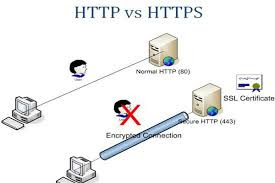
HTTP Vs HTTPS ? Online Security? SSL Certificate? SSL Encryption?

Image
We all are using internet everytime But we got confused when our favourite website address are not in same format, some times it was HTTP in starting of address or sometimes it was in HTTPS. So today i am going to tell you about what is the main difference between both of them and who is the better for you and how you can maintain your basic privacy on internet.Concept between both of them is very clear, Simple and exciting. If you understood this concept then you can escape your privacy from any hacker or attacker. Here http stands for Hyper Text Transfer Protocol. which is some set of rules on which internet is working and we can exchange any information frequently. Means whatever information we are sending on that website server or whatever information we are accessing from that website server is opened and link between our system to that web server is in plain text. If any hacker or attacker want to monitor your system and they are sniffing the packets which are goi...

What Is SEO / Search Engine Optimization (SEO)???!

Image
Today I am going to share to all of you a technique from which you can be on the first page of any Search Engine Result Page (SERPs) i.e. Google, Yahoo, Bing etc. This technique is SEO which stands for Search Engine Optimization. Search engine optimization is a methodology of strategies, techniques and tactics used to increase the amount of visitors to a website by obtaining a high-ranking placement in the search results page of a search engine (SERP) -- including Google, Bing, Yahoo and other search engines. It is common practice for internet search users to not click through pages and pages of search results, so where a site ranks in a search results page is essential for directing more traffic toward the site. The higher a website naturally ranks in organic results of a search, the greater the chance that that site will be visited by a user.SEO helps to ensure that a site is accessible to a search engine and improves the chances that the site will be found by the search engine....